



Roobet Mobile App

Roobet Australia was designed for gamers on-the-go, but there is no Roobet app. Instead, the company presents the mobile version of the site, and the casino leaves nothing to be desired. Everything offered in the desktop version is available on your smartphone. You can get everything from Originals and pokies to live dealer games and the full reward system. Unlike many mobile versions of other casinos, Roobet’s mobile site has no restricted lobby or unavailable options. The casino loads directly in the browser, and there is no need to download anything from any app stores prior to the gaming session.
Add Roobet to Your Home Screen
If you prefer an application-style approach, you can install Roobet casino as a progressive web app (PWA). This will add an icon to the home screen and launch the casino in a separate window without browser navigation buttons. You’ll enjoy an app-like experience that takes up very little storage space on your phone. The method is supported by Android and iPhone devices, and the installation process doesn’t take more than one minute.
A single profile connects desktop and mobile sessions on Roobet Australia.
Roobet on Android
Progressive web applications function excellently on Android, and Chrome manages all the work alone. All that needs to be done is just opening the Roobet page on Chrome, as no other programmes are used. Some devices have an installation banner appearing right on the first opening of the site at the bottom of the screen. It is enough to tap on it.
In case it does not appear, the menu in the browser will manage the task in several clicks. Here are the steps that should be followed.
- Visit the Roobet website in Chrome on your Android device.
- Tap three dots in the top right corner.
- Select “Add to Home screen” or “Install app”.
- Give a name to the shortcut.
- Tap “Install” to confirm.
- The icon will appear on your home screen.
After installation, the casino opens in a separate window that does not have an address bar. Unlike a regular downloaded application, the game does not occupy too much space since it comes straight from the server. Automatic updates also mean that users do not need to think about having an outdated version. Also, the removal process is quite simple.
Roobet on iPhone and iPad
This process works on iPhone too, but it’s located within Safari and not Chrome. In the case of progressive web apps, Apple uses the share menu as a route to their installation, and that’s why people might overlook them the first time around. The steps below use Safari; menu labels and installation options can vary with the iOS version.
- Go to the Roobet website.
- Tap the share icon at the bottom of the screen in the form of the box with an arrow.
- Scroll down the share menu and click the “Add to Home Screen”.
- Write the name of the shortcut.
- Tap “Add” in the top corner to finish.
The icon is placed on the home screen together with other native applications and will run in full-screen view mode. For iPad users, it is just the same process, and only the interface scales up for the large display. Since the Roobet mobile version of the site is a web application, there’s no waiting for store approval or a lengthy download process.
One Account Across Your Devices
There is no need to register again for using the mobile version, and which often surprises new users. One account is universal, meaning the profile made from a laptop will work right away on the phone. The balance, rakeback level, rewards progress, and game history do not depend on the device used.
The procedure of logging into the mobile version is the same as on the website. In the short login form, Roobet asks for the username or the linked email and the password. Users who registered with Google and Metamask accounts use the corresponding buttons to enter the service. A link to the page where users can reset the password is located below the input field.
It does not matter on which device the session started since switching between them will go smoothly. For example, users may start playing on the desktop in the evening and continue on their phone the next morning. All funds are stored in the Iron Pouch and are tied to your account, not to a specific device. Rakeback and RooSpins can be obtained both ways.
Explore the Mobile Casino
Mobile layout doesn’t copy the desktop design and shrink it. The side menu moves into a button, and the game grid adapts into columns for a narrow screen. All the buttons are accessible by fingers, and the search bar is located near the top of the screen. There is nothing hidden and inaccessible, which helps users navigate quickly through the interface on a mobile device. Almost all the necessary elements from the desktop version are here:
- Category menu for Originals, Slots, Live Casino, and Game Shows;
- Search bar with sorting tools and filters;
- Cashier with deposits, buys, and withdrawals;
- Reward page with rakeback, RooSpins, and offers;
- Live RTP page that shows how games currently pay;
- Live support available.
Games adapt properly rather than being squeezed into a mobile interface. Slots fit the screen size, spin buttons are located on a spot where a user can reach with fingers, and many games can be played in portrait mode. Live casino games adapt to the connection speed available on the mobile Internet, so players can have an enjoyable experience playing games on the go. And Originals are particularly suitable for smartphones because of the simplicity of their controls.
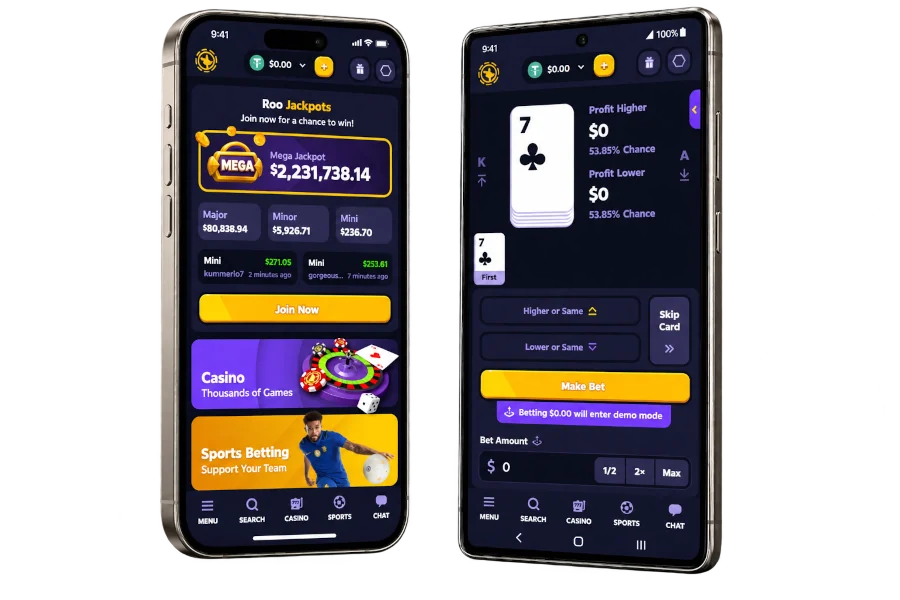
Nothing is withheld from phone gamers, and using the PWA is an option, not a necessity. If you’re content playing in the browser, you can continue without changing a thing. For the rest, Roobet’s app icon is only one tap away.